In October 2026 Shopify added batch fulfillment to the admin. If you've been fighting the 50-order limit, it's a real upgrade, and it's free. I build a pick and pack app, so you'd expect me to tell you it isn't enough. For a lot of stores, it is. Here's where the line is.
What Shopify's batches do
From the Orders page you select orders and choose Create batch, or use Batch recent orders to grab the most recent unfulfilled orders from the last 14 days. A batch then moves through steps you can rearrange:
- Up to 250 orders per batch, with one pick list for the whole batch.
- Pick, Print and Pack steps. Print buys labels and prints packing slips. You can assign a staff member to each step.
- Scan to verify as a batch step (in Pack by default), with a tone and a green check for a right item and a red error for a wrong one.
- Pick list fields include product image, variant, SKU, quantity and bin name.
- Included in your plan, with no extra fee.
To use it, you need a location you manage yourself in a country where Shopify sells shipping labels. A location run by a fulfillment service doesn't count.
When native batching is enough
If you, or you and one other person with a Shopify login, pick and pack your own orders, native batching covers most of the job. One list, one walk of the floor, a scan check before the box closes. You don't need an app for that anymore, and I'd rather you know that before you install one.
The one thing native batching asks of a small store is the batch itself: you build one before you can scan. If you pack orders as they come in, one at a time, that's a lot of ceremony per order. Pickadoodl's Quick pack skips it: scan the barcode on the packing slip, scan each item, fulfill, next. It's on the free plan. How to check every order before it ships covers the routine either way.
Where it gets thin: a team
Things change once picking is done by people who aren't you, especially seasonal help for Black Friday and the holidays.
Everyone needs a Shopify login
Batches live in the Shopify admin, so whoever works one needs an admin login. Shopify's Basic plan doesn't include additional staff accounts, Grow includes up to 5 and Advanced up to 15. Adding a temp packer as staff is slow, and it gives them access to far more than one batch.
In Pickadoodl you send a picker link instead. It opens one batch in a phone browser, with camera scanning, and nothing else in your store. Links expire on a schedule you set, and you can turn one off any time. Pickers choose their name, so you still see who picked what.
Nothing is said about missing items
Shopify's help article doesn't describe what happens when an item is short or damaged mid-batch. On a team, that's a daily event. Pickadoodl lets a picker flag a short pick, damage or a backorder. Flagged orders are left out of fulfillment until someone sorts them out, then you can choose Fulfill skipped orders anyway.
You can't see who's on what
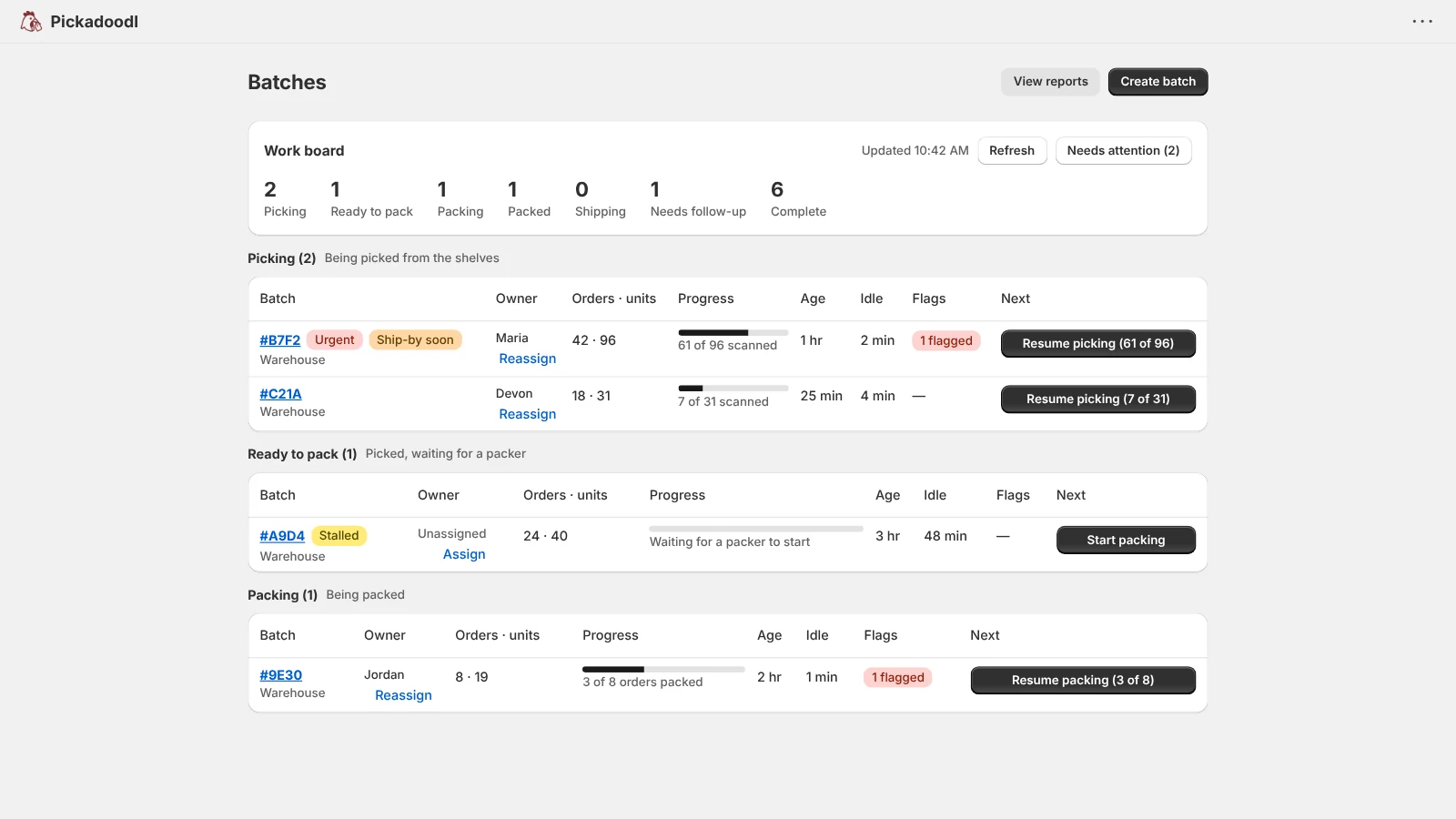
With several batches moving at once, you need to know which one is stuck. Pickadoodl's work board groups every open batch by stage and flags one as stalled if nothing has changed in 4 hours. You can assign an owner and priority, and get Slack alerts.
One list per batch
Native batches give you one pick list. If your team picks into carts or totes, Pickadoodl's cart picking tracks which order is in which tote.
Side by side
| Shopify batches | Pickadoodl | |
|---|---|---|
| Orders per batch | Up to 250 | No batch cap; plan limits are monthly |
| Scan to verify | Yes, as a batch step | At pick and at pack |
| Who can work a batch | Staff with a Shopify login | Anyone you send a picker link |
| Short picks and damage | Not described | Flagged, held back, resolved before fulfilling |
| Seeing every batch at once | Batch list | Work board with owners and stalled flags |
| Labels | Shopify Shipping | Your own EasyPost account (Pro) |
| Cost | Included | Free to 75 orders/mo, then $10.99 or $19.99 |
A simple way to decide
- Solo or two people with logins, packing in batches: start with Shopify's batches.
- Packing orders one at a time as they come in: try Pickadoodl's Quick pack, with no batch to build.
- Bringing on seasonal or part-time help: try Pickadoodl before the rush, so they're trained before the busy days.
- Several people and several batches a day: you'll want exception handling and a work board. That's what Pickadoodl is built for.
Pickadoodl's free plan covers 75 orders a month with every feature, including picker links, so you can run a real batch with your team before you pay anything.