
Features / Serial and lot tracking
Know which serial or lot went to which customer
Pickadoodl records a serial number for every unit, or a lot number for each line, while the order is packed. The numbers are saved to the Shopify order, and one search finds every customer who got a given serial or lot.
Who it's for
Electronics with warranties, supplements and cosmetics with batches and expiry dates, food, anything a supplier might recall. If you've ever had to work out who got a bad batch from spreadsheets and memory, this is the fix.
Recorded while packing, not after
- Choose the products. In Settings, pick products with Shopify's product picker or by SKU or barcode, for the whole product or only some variants. Many at once? Import them from a CSV.
- Serial numbers. One per unit. After each unit is scanned into the box, the packer scans its serial barcode.
- Lot numbers. Scan the lot once and say how many units came from it. A line from two lots gets a second lot, and the next unit from the same lot is added automatically.
- Packing can't finish without them. An order with a missing number can't be marked packed until it's recorded, or the order is flagged.
Mistakes caught at the bench
- The product's own barcode. Scanning the item's barcode or SKU instead of its number is caught.
- Repeated serials. A serial already packed for the same product is stopped, with the order it went to. A manager can allow it with a reason, like a warranty swap.
- Lot formats. Set a format like L##### and a lot that doesn't match is refused.
- Expiry dates. Ask for an expiry per lot, and an expired lot needs a deliberate “Pack it anyway”.
On the Shopify order, and searchable
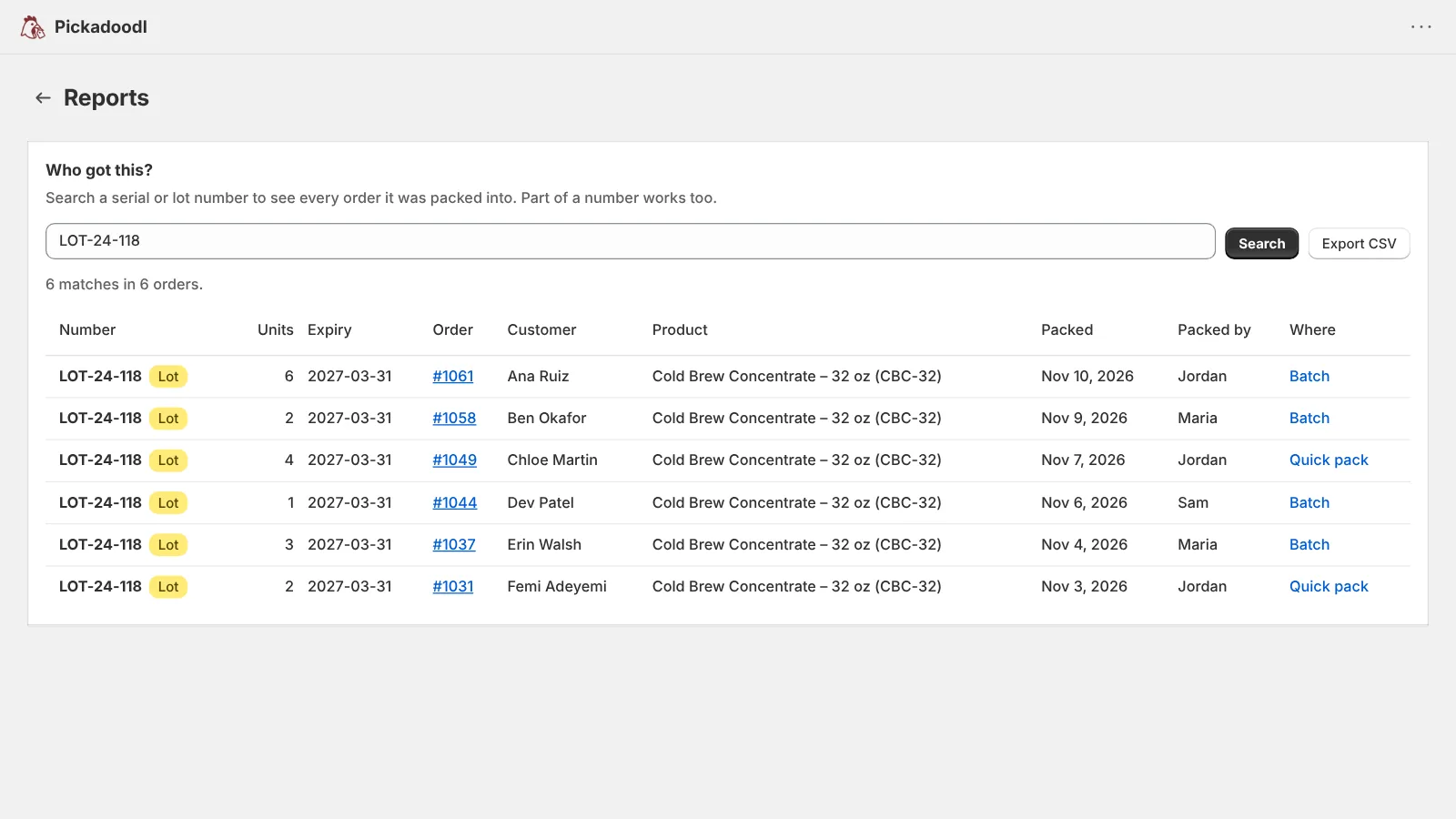
When packing finishes, the numbers are copied to a pinned “Serial and lot numbers” field on the Shopify order, where your team can see them. In Pickadoodl, Reports → Who got this? searches any serial or lot, or part of one, and lists every order it went to with the customer, product, date and packer. Export the list as a CSV for a recall or a warranty claim.
Corrections without losing the history
Misread a label? A manager can correct a number at any time, even after shipping, with a reason. The old value stays in the history, and the Shopify order is updated.
Questions
Which plan includes serial and lot tracking?
Every plan, including Free. Plans differ by monthly order count and shipping labels, not by features like this.
Does it work in Quick pack and on work links?
Yes. Packers are asked for numbers in batches, in Quick pack and on work links. Only a manager in the Shopify admin can allow a repeated serial or correct a number after packing.
Does Pickadoodl track inventory by lot?
No. Pickadoodl records which serial or lot went out on each order. It doesn't count stock by lot or expiry date; that's a job for an inventory or warehouse system.
Where do the numbers show in Shopify?
On the order page, in a pinned “Serial and lot numbers” field your team can see but not edit, so they stay in step with Pickadoodl’s history.

Try it on your own orders.
Free up to 75 orders a month, with every feature. If anything trips you up, email me. I read every message.
Install free on Shopify