A customer wants to send something back. You can tell them to find their own way to the post office, or you can send a label they print and stick on the box. A prepaid label costs you postage, but it gets the item back faster, with tracking, and it's the difference between a return and an angry review. Here's how to send one from Shopify, and when each way makes sense.
Should you pay for return shipping?
It's a business decision, not a rule. Some common setups:
- Free returns, always. Simple to explain, and it sells. You pay the postage, so it needs to be priced into your margins.
- Free for your mistakes, paid for theirs. Wrong item or damaged: you send a prepaid label. Changed their mind: they pay, or you deduct the postage from the refund.
- A flat return fee. You send the label and deduct a fixed amount. Shopify's return screen has a return shipping fee field for exactly this.
Whichever you pick, write it in your returns policy so you don't decide case by case.
Option 1: Shopify's built-in return label
If you ship with Shopify Shipping, open the order, choose Return, pick the items and a reason, and under Return shipping options choose Create a return label in Shopify. It's the quickest route, with one big limit: Shopify only offers it when you have a location in the same country as the customer, and that country is the US or Canada. Shopify Shipping describes these as domestic return labels, and you can void an unused one for a refund.
Option 2: Upload a label you made elsewhere
The same return screen has Upload a return label: attach a PDF or image, or a link, plus a tracking number and carrier. Use it when you buy labels on your carrier's own site, through ShipStation, or with another shipping app. It keeps the label on the order, even though you made it somewhere else.
Option 3: Your own carrier account, from a returns or shipping app
Apps that buy labels through your own carrier accounts (EasyPost, ShipStation, Shippo and others) can usually make return labels too. The label is a normal shipment with the addresses flipped: from the customer, back to you. This is the route when you want your negotiated rates, when the customer is in another country, or when returns are handled by someone who isn't working in the Shopify admin.
Getting the label to the customer
- Email the link, don't attach a file. A link to the label PDF is easier to open on a phone and less likely to be caught by a spam filter.
- Say what goes in the box. "Send back the medium navy tee, in any box, with this label on the outside."
- Mention the drop-off. Which carrier, and whether they can schedule a pickup or need to drop it off.
- Give a deadline. "Please send it within 14 days." It keeps unused labels from sitting around.
Don't pay for labels nobody uses
The cost of prepaid returns isn't only the labels that get used. It's the ones you paid for that never got scanned. Most carriers refund an unused label if you void it in time; USPS labels can be refunded within 30 days if they were never scanned, and UPS and FedEx allow longer. Two habits help:
- Keep a list of returns that are waiting for a package, with the date the label went out.
- Once a week, void any label that's older than your deadline and still hasn't moved.
International returns
A customer abroad needs a label from their country to yours, with a customs form that declares the items as returned goods, so you aren't charged import duty on your own product coming home. Shopify's built-in return labels are domestic, so this is a job for your own carrier account or a shipping app. Use the same descriptions, HS codes and countries of origin you used going out: our customs guide covers where those live in Shopify.
How Pickadoodl does it
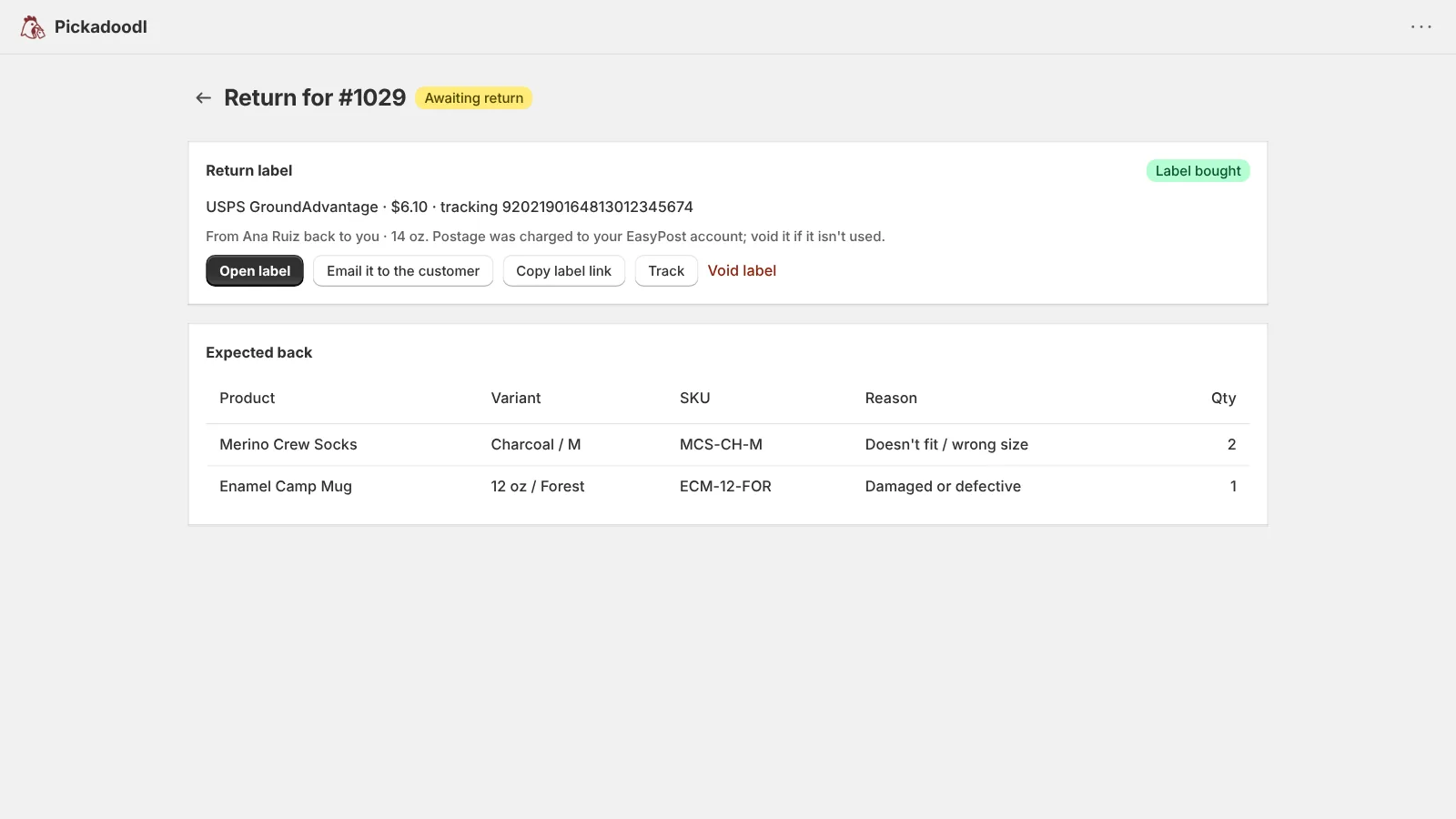
I build Pickadoodl. On the Pro plan, with your own EasyPost account:
- Start a return, enter the order number, the package weight and the box, and choose Get rates. The label goes from the customer's shipping address back to your ship-from address.
- Pick a rate and buy it. Then Open label, Email it to the customer (it opens your email with the link filled in) or Copy label link.
- The return shows as Awaiting return until you scan the items in, so you know which returns are still out and which package is which when it lands.
- An unused label can be voided for a refund from the same screen.
- Customers in other countries get a customs form declaring the returned goods.
When the box arrives, scan the items in, choose a reason, and restock what's sellable into Shopify. See the returns help.