
Features / Shipping labels
Buy the label right in the batch
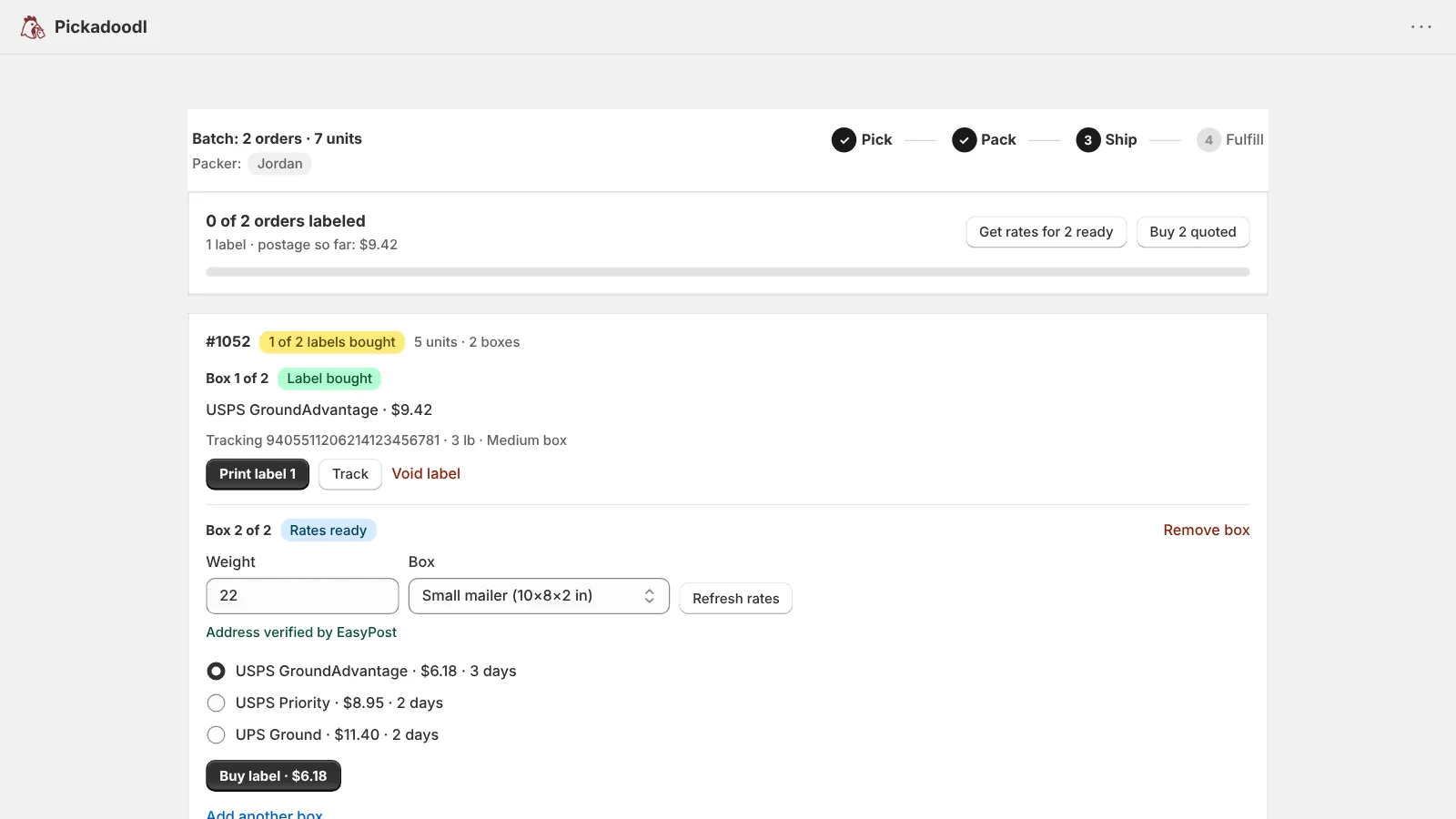
On the Pro plan, enter a weight and box as you pack, compare carrier rates, and buy and print labels without leaving Pickadoodl. Postage is billed to you by EasyPost.
Your account, your rates
Pickadoodl uses your own EasyPost account. Postage is billed to you by EasyPost and never passes through Pickadoodl, so there's no markup and no postage balance to top up here. With a production key, negotiated rates from your own carrier accounts show up too.
How it works
- Connect EasyPost under Settings → Carrier shipping. The key is stored encrypted and never shown again. A free test key (starting
EZTK) produces sample labels at no cost. - Add your box sizes. Labels ship from your Shopify store address unless you set another ship-from address.
- Pack as usual. Packing an order asks for its weight and box. You can skip it and fill it in later.
- Ship step. When every order is packed, Get rates shows carrier options per order. Buy one, or use Buy quoted for many at once after confirming the total.
- Fulfill. Tracking number, carrier and link go to Shopify with the fulfillment, so the customer's shipping email has real tracking.
Problems become flags, not silent misses
If a label can't be bought (a bad address, no rates, a carrier problem), flag the order as a shipping issue. It's held out of the fulfill call like any flagged order, and you can fulfill it later once it ships another way.
Bought the wrong box, weight or service? Void label on the order asks EasyPost to refund it, and the order goes back to needing a label. Refunds are up to the carrier: USPS within 30 days if the label was never scanned, UPS and FedEx within 90 days.
Addresses checked before you buy
When you get rates, Pickadoodl asks EasyPost to check the address first. A suggested correction, like a wrong ZIP, shows next to the address as entered, and you choose which to ship to. An address that may not be deliverable can be fixed, flagged, or shipped anyway. The order in Shopify isn't changed.
Return labels too
From a return, buy a prepaid label for the customer to send items back, through the same EasyPost account. Open it, email it, or copy the link. Returns
International orders, with the customs form filled in
An order going to another country gets a customs form with its label. Pickadoodl fills it in from the order: each item's description, quantity, price paid and weight, plus the HS code and country of origin you've set on the product in Shopify. Set a customs signer and default codes once in Settings for products that don't have them. Anything still missing is listed before you get rates, so nothing is bought until the form is complete. If a carrier refuses the shipment, the order is flagged as a shipping issue.
Orders that need more than one box
When an order doesn't fit in one box, add another while packing or on the Ship step, each with its own weight and size. Every box gets its own label, and all of the tracking numbers go to Shopify on the one fulfillment. Void and re-buy any box on its own.
Already happy with ShipStation or another shipping tool? Shipping is optional and off until you connect EasyPost. Pick and pack here, and keep shipping where you are.
Questions
Which plan includes shipping labels?
Pro, at $19.99/month with unlimited orders. Free and Standard include the full pick, pack and fulfill workflow without labels.
Does Pickadoodl mark up postage?
No. You use your own EasyPost account, and EasyPost bills you for postage directly.
Can I ship internationally?
Yes. The customs form is filled in from the order and your products' HS codes and countries of origin in Shopify, and anything missing is listed before you buy.
Can I test it without buying postage?
Yes. A free EasyPost test key runs the whole flow with sample labels.
Try it on your own orders.
Free up to 75 orders a month, with every feature. If anything trips you up, email me. I read every message.
Install free on Shopify